In response to feedback from several FrameAlbum users I’ve added a few interface changes to the website today.
Channels & Frames now have distinct ‘delete’ actions.
You may now ‘cancel’ a channel or frame deletion without hitting your browser’s function.
A few formatting changes to make the site a bit less ugly.
Sample images are no longer grotesquely mangled.
New delete actions
Previously there was a ‘delete’ checkbox on the frame and channel edit pages but it wasn’t very obvious. I’ve added a clickable ‘delete’ action icon on the frame and channel info. pages to save a few clicks and to make things a bit more obvious. I’ve also changed the ‘edit’ action from a text link to an icon .
Minor format changes
The title text is a bit larger, the channel icons should be more consistently sized.
Sample images no longer mangled
I’ve fixed the formatting of the sample images in the channel displays. They will now maintain their original aspect ration and not be forced into a square shape.
These changes are live on the site now. I hope you find them useful.
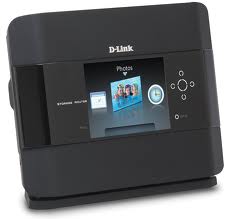
I was finally able to get my hands on a cheap D-Link DIR-685 router/frame. This is a combination WiFi router + network storage device with a teenie-weenie 3.2 inch frame. It naively supports FrameChannel as well as Microsoft’s defunct FrameIt service.
I fired it up, ran a cable from my existing network into the ‘internet’ jack (right-most jack on the back of the unit), and plugged my laptop into one of the 4 remaining jacks. I then started up my laptop and opened a browser and entered ‘http://192.168.0.1’ into the address bar. After entering the password (the default is no password — wow, that’s profoundly bad.) I was presented with the administration page.
I went to the ‘SETUP’ page, then choose ‘Internet Setup’ on the left. I then clicked the ‘Manual Internet Connection Setup’ button. I made sure the ‘Internet Connection Type’ was set to ‘Dynamic IP (DHCP)’ and ‘Advanced DNS Service’ was off. Further down the page is an option to enter ‘Primary DNS address’ – GOAL!
I have setup a customized DNS server that will correctly route requests made by the device to the FrameAlbum service rather than the original FrameChannel servers. In the ‘Primary DNS address’ field enter 64.2.142.181 and then ‘Save Settings’. You can leave the other fields on this page unchanged.
I then rebooted the DIR-685 and activated the FrameChannel option. I was watching the logs on the FrameAlbum server and I saw the request come in and then the server promptly generated an error message — DOH! A quick update of permissions on one of the servers directories and retried it — WHAM! I see the beautiful green ‘here is your activation code’ image on my itty-bitty screen.
I ran back to my computer, activated the screen on my FrameAlbum account, assigned it a channel and a while latter I was squinting to see my tiny photos on the screen. Yippie!
I did find another bug during this process; the system did not correctly identify this frame as a D-Link product so I have some work to do to track that down — not a biggie, it works just fine the way it is.
Sadly, I’ve learned that the DIR-685 differs from the DSM-210 in that it does not use the same requests when talking to the server. I was hoping to use this device as a surrogate to add support for that popular frame, but alas, no such luck.
So while I can cross the DIR-685 off the list of frames to test on the service I’m still in need of a DSM-210 to be able to add support for that frame. If anyone has one they aren’t using and would be willing to sell cheap, drop me a line.
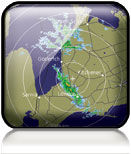
I missed a tidbit during the software update last weekend that broke the weather radar feed for some folks. Computers are so damn literal, what’s one ‘/’ matter in the Real World anyway? Opps.
I’ve been gathering info. on the various internet enabled digital photo frames for a while now. I’ve been using Evernote to keep it (somewhat) organized but I’ve gotten to the point where I want to share what I’ve collected. Release the Wiki!
At present I’ve loaded up information on 40 digital photo frames. I know there are plenty more out there; if you have a frame that is not listed please, Please, PLEASE drop me a msg. and I’ll add it to the archive.
I’m also going to include information on the FrameChannel protocol that I’ve gathered while developing the FrameAlbum service.
The moment two or three of you have been waiting for… the release of FrameAlbum 0.1.
This release includes:
FrameChannel compatable RSS feed generation
FrameChannel photo frame ‘protocol’ support
Flickr, Picasa and weather radar image channels
A crude but functional web interface to control the feeds
There is no documentation in this release; you’re rather on your own for setup & configuration. The MySQL database schema is included but there is no automated process to build the DB.
A great percentage of this code was whipped together in a frenzy of Mt. Dew and Butterfingers and I am by no measure a PHP or PERL expert so please be kind in your comments. In fact, criticisms in any form other than code patches will be sent to /dev/null. 😉 (That’s really funny to the geeks in the audience, trust me.)
You can grab the code on GitHub here: http://bit.ly/NRylHM (Yes, I know that’s not a GitHub link but I’m using Bitly so that I can gauge how many folks are interested in the code.)
Now that the code is finally released I can focus on the new feature list that has been languishing for way-too-long (Facebook, I’m taking about you.)
C U on the bitstream.
T.
Digital Media and whatever else flows through my head…
Cookie Consent
We use cookies to improve your experience on our site. By using our site, you consent to cookies.
Contains custom information set by the web developer via the _setCustomVar method in Google Analytics. This cookie is updated every time new data is sent to the Google Analytics server.
2 years after last activity
__utmx
Used to determine whether a user is included in an A / B or Multivariate test.
18 months
_ga
ID used to identify users
2 years
_gali
Used by Google Analytics to determine which links on a page are being clicked
30 seconds
_ga_
ID used to identify users
2 years
_gid
ID used to identify users for 24 hours after last activity
24 hours
_gat
Used to monitor number of Google Analytics server requests when using Google Tag Manager
1 minute
_gac_
Contains information related to marketing campaigns of the user. These are shared with Google AdWords / Google Ads when the Google Ads and Google Analytics accounts are linked together.
90 days
__utma
ID used to identify users and sessions
2 years after last activity
__utmt
Used to monitor number of Google Analytics server requests
10 minutes
__utmb
Used to distinguish new sessions and visits. This cookie is set when the GA.js javascript library is loaded and there is no existing __utmb cookie. The cookie is updated every time data is sent to the Google Analytics server.
30 minutes after last activity
__utmc
Used only with old Urchin versions of Google Analytics and not with GA.js. Was used to distinguish between new sessions and visits at the end of a session.
End of session (browser)
__utmz
Contains information about the traffic source or campaign that directed user to the website. The cookie is set when the GA.js javascript is loaded and updated when data is sent to the Google Anaytics server

 on the frame and channel info. pages to save a few clicks and to make things a bit more obvious. I’ve also changed the ‘edit’ action from a text link to an icon
  .
.